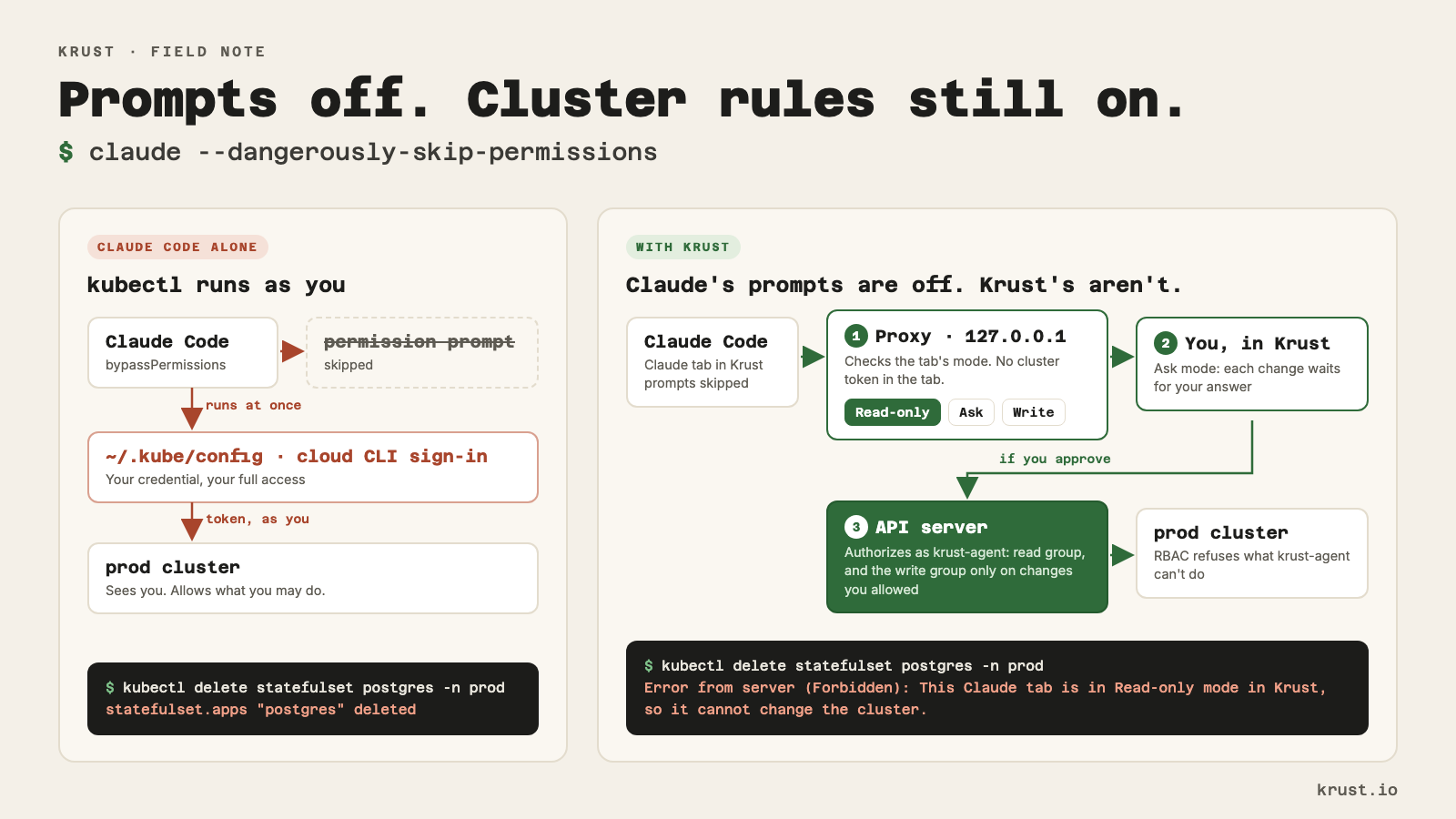
claude --dangerously-skip-permissionsMost people who type this are tired of pressing Enter. Claude asks before every kubectl get, every edit, every helm template, and after the fiftieth prompt you stop reading them anyway. The flag makes the prompts go away.
It also makes Claude Code’s own guardrails go away. Before you run it on a laptop that can reach production, it’s worth knowing exactly what it skips, what still stops a bad command, and where that stop lives.
What --dangerously-skip-permissions does
The flag starts Claude Code in bypassPermissions mode. It is the same as:
claude --permission-mode bypassPermissionsIn that mode Claude Code runs tool calls without asking you first: shell commands, file edits, web fetches, even writes to protected paths such as .git and .claude. A few things still stop and ask, according to Claude Code’s permission docs: explicit ask rules, tools that need your input, and rm or rmdir on critical paths. It also refuses to start as root or under sudo.
Anthropic is direct about where it belongs. The docs say to use this mode only in isolated environments, like containers or VMs without internet access, and that it “offers no protection against prompt injection or unintended actions.”
That last part matters most. The permission prompt was the moment you got to read what Claude was about to do. With the flag, a command Claude decided to run, or was talked into running by a README, an issue comment or a log line, runs straight away.
What it means for kubectl
Claude Code runs kubectl the way you do: with your kubeconfig and your cloud CLI sign-in. Whatever you can do on a cluster, a command in Claude’s shell can do too.
With prompts on, a kubectl delete at least waits for you. With --dangerously-skip-permissions, nothing between Claude and the API server asks anything. The only thing that decides whether the delete happens is what your credential is allowed to do, and on most laptops that’s a lot.
This isn’t hypothetical. In July 2025, Replit’s AI agent deleted a company’s production database during a code freeze, then said it couldn’t be recovered. It could: the rollback worked. In August 2025, the malicious Nx “s1ngularity” npm release ran a postinstall script that launched the developer’s own Claude Code with --dangerously-skip-permissions, and Gemini CLI and Amazon Q with their own bypass flags, to search the disk for secrets. The agent was already installed and already signed in. The attacker only needed the flag.
Claude Code’s permissions live in the agent
Every guardrail Claude Code has (allow and deny rules, permission modes, hooks) is enforced by Claude Code itself, on your Mac. That works when you start Claude the way you meant to. It does not hold when:
- someone, or something, starts Claude with a flag that turns the checks off
- a settings file is changed
- the command runs in a shell that isn’t Claude at all, using the same kubeconfig
None of that is a flaw in Claude Code. A guardrail inside a process can only protect you from that process behaving as configured. For a cluster, you want a limit that doesn’t care how the agent was started.
Put the limit where kubectl’s requests go
In a Krust Claude Code tab, the tab never holds the cluster credential. Its kubeconfig names a local proxy on 127.0.0.1 and a proxy token the cluster doesn’t accept. Every kubectl and helm request goes through that proxy, and the proxy checks it against the tab’s mode:
| Mode | Reads | Changes, exec, port-forward |
|---|---|---|
| Read-only | Yes | Refused |
| Ask | Yes | Each one waits for your answer in Krust |
| Write | Yes | Allowed. On a protected cluster, for 15 minutes at most |
Here’s the part that matters for this post: Ask is answered in Krust, not in Claude Code. --dangerously-skip-permissions turns off Claude’s prompts. It can’t turn off Krust’s, because they aren’t Claude’s to skip. Run Claude with the flag in an Ask tab and every kubectl get, describe and logs runs without a single prompt, while a kubectl delete still waits for you.
In Ask, Krust turns off Claude Code’s own prompt for kubectl, because Krust asks instead. In Write, Krust leaves the asking to Claude Code, and that’s exactly the prompt the flag removes. Don’t combine Write with the flag.
In a Read-only tab, the delete doesn’t wait. Claude gets an error it can read and act on:
$ kubectl delete pod api-7f9c
Error from server (Forbidden): This Claude tab is in Read-only mode in Krust, so it cannot change the cluster. Suggest the command to the user, or ask them to switch the tab to Ask or Write in Krust.
In Read-only and Ask, Secret values come back as <hidden by Krust> (Helm release Secrets excepted). The proxy refuses impersonation headers in every mode, so --as and --as-group fail and Claude can’t pick a bigger identity for itself.
That gives you most of what people want from the flag (no prompts for reading, investigating, and running the read-only commands that make up most debugging) without giving up the one prompt that protects production.
Make the cluster refuse it too
The proxy is still software on your Mac deciding what’s a change. If it misread a request, that request would reach the cluster as you.
Cluster enforcement closes that gap. On a protected cluster, Krust sends Claude’s requests as krust-agent, a separate Kubernetes user with fewer permissions than yours, using impersonation. Your credential still authenticates the request, and the API server authorizes it with only the agent’s groups:
krust:agent-readon every request:get,listandwatchkrust:agent-writeonly on changes the tab’s mode let through: the built-ineditrole by default
Before using krust-agent, Krust checks that the setup is there, then asks the cluster two questions. Can the read group alone create pods? Can both groups together create ClusterRoleBindings? If either answer is yes, the setup is too broad, and Krust says so instead of using it. The pods question covers every namespace at once, so a grant in a single namespace isn’t caught: check the namespaces that matter yourself.
So with cluster enforcement, a command Claude runs without asking you has to get past three things:
- Krust’s proxy, which checks the tab’s mode.
- Your approval in Krust, if the tab is in Ask.
- The API server, which allows only what
krust-agent’s groups allow.
None of them depends on how Claude Code was started. The third doesn’t even depend on Krust being right. You can check what the cluster will allow yourself:
kubectl auth can-i delete statefulsets -n payments \
  --as=krust-agent --as-group=krust:agent-read
# no

kubectl auth can-i create clusterrolebindings.rbac.authorization.k8s.io -A \
  --as=krust-agent --as-group=krust:agent-read --as-group=krust:agent-write
# no
And when something does run, the audit log shows krust-agent acting for you, with the tab’s mode and session, instead of just your name.
Can Claude still delete a production database?
Be honest about the default. Approved writes run with the built-in edit role, which can delete a StatefulSet or a PersistentVolumeClaim in the namespaces it covers. If you approve the delete in Ask, or switch the tab to Write, it happens.
To keep a namespace out of reach entirely, bind the write group only where Claude may change things, for example a RoleBinding in staging instead of a ClusterRoleBinding. Kubernetes RBAC for AI agents has the full YAML and the narrower options, including read-only everywhere.
What the flag still leaves open
Krust limits what reaches your cluster through the tab. --dangerously-skip-permissions is about more than the cluster:
- Files. Claude can edit or delete anything your user can, without asking.
- Other commands.
curl,ssh,terraform,aws,gcloud: anything on yourPATHruns as you. - Credentials on disk. A kubeconfig or a
gcloudor AWS CLI sign-in elsewhere on the Mac still reaches the cluster as you, without Krust. Say goodbye to kubeconfig has the checklist for removing them. - The network. Anything Claude reads can carry instructions, and anything it can reach, it can send to.
For those, use what Anthropic recommends: a container or VM, or Claude Code’s sandbox, which limits writes to the working directory and sends network traffic through an allowlist. On macOS, a sandboxed kubectl can’t reach Krust’s proxy on 127.0.0.1 unless you set network.allowLocalBinding to true, which opens every localhost port to sandboxed commands. Or use auto mode, where a classifier reviews actions instead of you. Krust and a sandbox don’t overlap. One limits what the agent can do to your Mac, the other limits what it can do to your cluster.
A setup that works
If you want Claude Code to work on Kubernetes without prompts:
- Remove the kubeconfig and cloud CLI sign-ins Claude doesn’t need.
- Run Claude in a Krust tab, in Read-only for investigating and Ask for changes.
- Turn on cluster enforcement for any cluster you’d hate to lose.
- If you use
--dangerously-skip-permissions, run it in a sandbox or container too.
The flag is called dangerous because it removes the one check you had. Put the checks that matter where the flag can’t reach them.
Download Krust and open a Claude Code tab on your cluster.