K9r looks familiar on purpose.
Open it and you see the same operating shape Kubernetes terminal users already understand: a resource table, namespace shortcuts, command mode, filter mode, logs, YAML, pod shell, attach, port-forward, and action keys. That is the point. K9r is not trying to invent a new terminal language for Kubernetes.
The difference is under the table.
k9s is a mature standalone terminal UI. It owns the whole product: Kubernetes clients, resource views, plugins, hotkeys, rendering, and cross-platform distribution. K9r is the terminal surface of Krust. It is packaged with the Krust macOS app and runs on the same Rust Kubernetes core that powers the native GUI.
That sounds subtle. It is not.
The Short Version
Use k9s when you want the most mature, open source, cross-platform Kubernetes TUI.
Use K9r when you are already using Krust on macOS and want the same Kubernetes runtime compressed into a keyboard-first terminal workflow.
| Area | K9r | k9s |
|---|---|---|
| Product model | Terminal surface for Krust | Standalone Kubernetes TUI |
| Core runtime | Shared krust-core Rust engine |
k9s Go runtime |
| Platform | macOS first, packaged with Krust | macOS, Linux, Windows |
| Install path | brew install --cask vanchonlee/tap/krust |
Homebrew, package managers, direct binaries |
| Source model | Part of Krust product family | Open source, Apache 2.0 |
| Best fit | Local Mac terminal flow backed by Krust state | General terminal Kubernetes operations, including SSH |
| Ecosystem | Tied to Krust roadmap | Mature plugin and community ecosystem |
If you only remember one thing: k9s is the independent terminal tool. K9r is the Krust terminal mode.
1. The UI Is Similar Because the Workflow Is Similar
Kubernetes terminal work has a natural rhythm:
:po
/checkout
Enter
l
y
Esc
:svc
You jump to a resource, filter the table, drill down, inspect logs, view YAML, and back out. k9s made that rhythm popular because it mapped Kubernetes operations to fast keyboard actions.
K9r follows that rhythm intentionally:
:for command/resource jumps/for filtering- namespace shortcuts
- Enter-based drill-down
lfor logspfor previous logsyfor YAMLdfor describe/detail- action keys for delete, restart, scale, trigger, cordon, drain, shell, attach, and port-forward
This is not where K9r tries to be different. The terminal workflow is already good. The question is what sits behind it.
2. K9r Reuses Krust Core Instead of Building a Separate World
Krust has three layers:
krust-core: Kubernetes clients, watchers, stores, logs, YAML, Helm, RBAC, CRDs, topology, exec, metrics, and port-forwarding- Krust macOS: the native Swift/AppKit visual workspace
- K9r: the terminal UI
K9r is valuable because it does not become a second Kubernetes implementation inside the same product. It reuses the same core behavior that the GUI uses.
That matters for product consistency:
- the same resource loading assumptions
- the same watch/cache model
- the same pod detail store
- the same log and YAML plumbing
- the same action boundaries
- the same port-forward implementation direction
If Krust improves core Kubernetes behavior, K9r can benefit from that work. If K9r exposes a terminal workflow that proves useful, Krust can reuse the same underlying capability in the GUI.
k9s does not need this because it is already a complete standalone product. K9r needs it because the goal is not “build another k9s.” The goal is “give Krust users a terminal surface without splitting the engine.”
3. K9r Is Mac-Local. k9s Is Everywhere.
This is the clearest difference.
k9s wins when the environment is:
- a Linux jump box
- an SSH session
- a remote bastion host
- a mixed OS team
- a CI or maintenance machine
- a cluster admin environment where installing a macOS app is irrelevant
K9r is aimed at a narrower environment:
- you are on macOS
- you use Krust or want Krust installed
- you want a local terminal UI next to the native GUI
- you want terminal speed without leaving the Krust product family
That narrowness is deliberate. K9r does not need to be the universal Kubernetes terminal. k9s already does that well.
4. The Cache Model Is the Real Product Bet
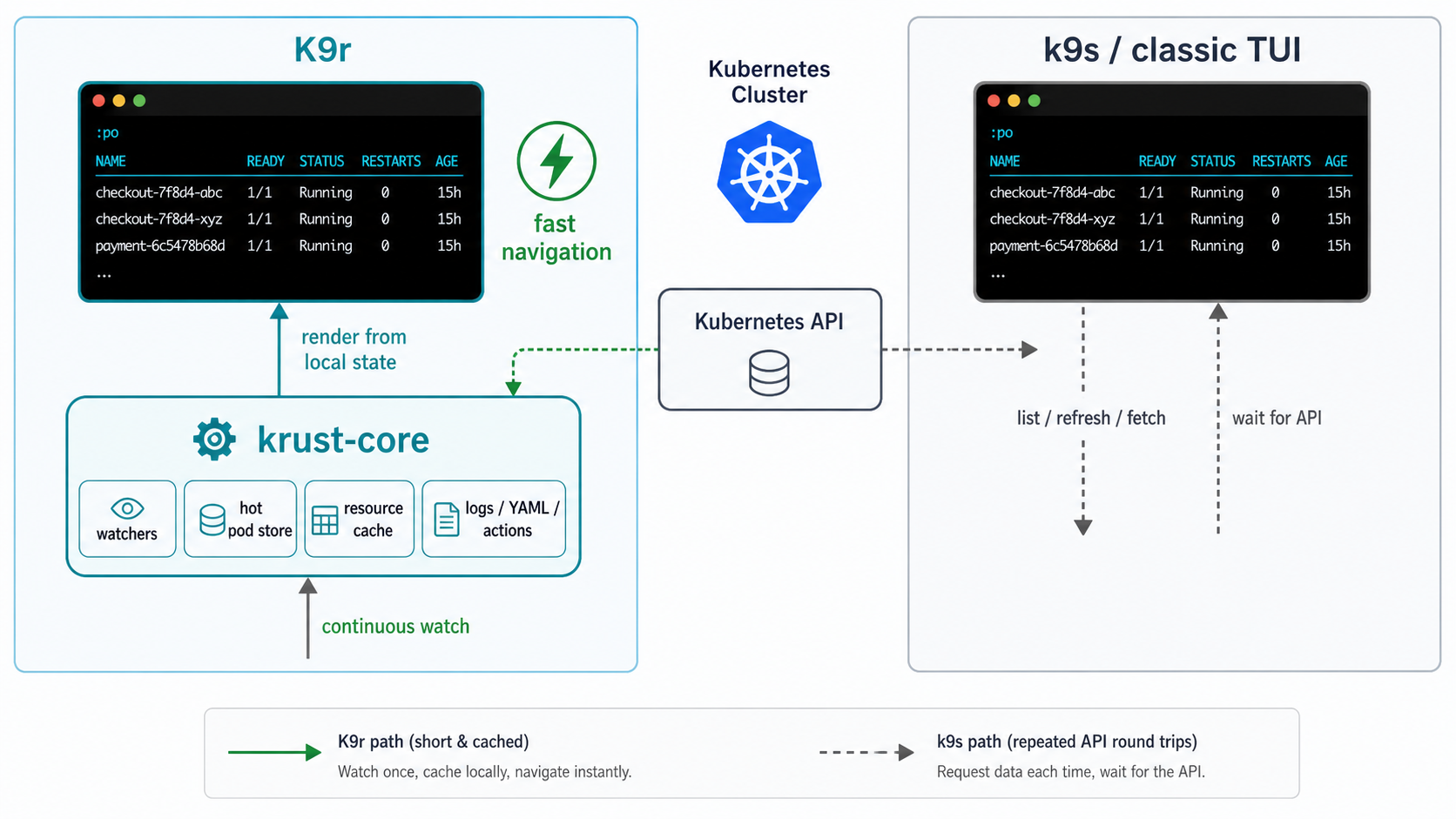
In a basic CLI workflow, every command is a new request:
kubectl get pods
kubectl get deploy
kubectl get svc
kubectl describe pod checkout-abc
kubectl logs checkout-abc
k9s improves this by keeping a live terminal session and refreshing resource views. K9r’s bet is that a terminal view should be backed by the same warm state model as the Krust app.
That means the terminal should feel less like “run a command, wait for output” and more like “move through already-known cluster state.”
This is most visible in drill-down flows:
- Deployment to Pods
- StatefulSet to Pods
- DaemonSet to Pods
- ReplicaSet to Pods
- Job to Pods
- Service to Pods by selector
- Node to Pods by node name
- Pod to Containers
- Container to Logs
For K9r, these are not just UI transitions. They are the terminal expression of a local resource graph and store.
5. k9s Has a Mature Extension Story. K9r Does Not.
k9s has years of operational surface area:
- plugins
- custom hotkeys
- aliases
- custom views
- skins
- Popeye integration
- broad resource coverage
- cross-platform packaging
- a large user base with established muscle memory
K9r is younger and narrower. It currently makes sense if you want the Krust engine in a terminal, not if you need the full k9s ecosystem.
That is an important distinction for teams.
If your operators already maintain k9s plugins and custom views, K9r is not a drop-in replacement. If your team already standardizes on Krust for macOS and wants a terminal companion, K9r is a better fit.
6. Logs and YAML Follow the Same Terminal Pattern
Both tools understand the daily loop:
- select a pod or workload
- open logs
- follow or stop following
- inspect previous logs
- view YAML
- edit through an editor
k9s has the mature version of this flow.
K9r’s difference is that logs and YAML are part of the same Krust core story. The GUI and terminal can share implementation direction instead of drifting into separate behavior. In practice, that matters when a feature exists in both places: log buffering, resource targeting, YAML loading, edit safety, and future cross-surface workflows.
K9r should not try to beat k9s by having a different key for everything. It should win by being consistent with the rest of Krust.
7. Safety Defaults Matter More in K9r Than They Look
Terminal tools are fast, which is both the feature and the risk.
K9r keeps dangerous operations behind explicit flows:
- delete confirmation
- pod kill confirmation
- rollout restart confirmation
- scale prompt
- CronJob trigger confirmation
- CronJob suspend/resume confirmation
- node cordon/uncordon/drain flows
- port-forward stop confirmation
k9s also treats destructive actions seriously. The difference is not that one cares about safety and the other does not. The difference is product context.
K9r has to align with Krust’s local-first, production-operations posture. If the GUI asks for confirmation before risky changes, the terminal surface should not bypass that just because the keyboard path is faster.
8. Which One Should You Use?
Use k9s if:
- you need Linux or Windows support
- you work over SSH
- you rely on plugins or custom views
- you want a fully open source Kubernetes TUI
- your team already has k9s muscle memory and configuration
- you need the most mature standalone terminal option
Use K9r if:
- you use Krust on macOS
- you want a terminal UI packaged with the native app
- you want k9s-style navigation backed by Krust core
- you want the same product family for GUI and terminal workflows
- you care more about local Mac operations than SSH-first workflows
- you want terminal drill-downs, logs, YAML, shell, attach, and safe actions without leaving the Krust runtime
Use both if:
- k9s is your remote/SSH tool
- Krust is your visual Mac workspace
- K9r is your local terminal companion
That is probably the healthiest framing. K9r does not need to kill k9s. k9s is already excellent. K9r exists because Krust users should not have to choose between a native GUI and a terminal flow when both can run on the same Kubernetes core.
The Honest Position
K9r is not “k9s but rewritten in Rust.”
That would be the wrong goal. k9s already exists, already works, and already has the ecosystem.
K9r is more specific: a Krust-powered Kubernetes TUI for Mac users who want the same runtime behind both their visual workspace and their terminal session.
If you want the universal Kubernetes TUI, use k9s.
If you want the Krust engine in a terminal, use K9r.
brew install --cask vanchonlee/tap/krust
k9r
See the K9r terminal preview, the K9r documentation, and the broader Krust vs k9s comparison.