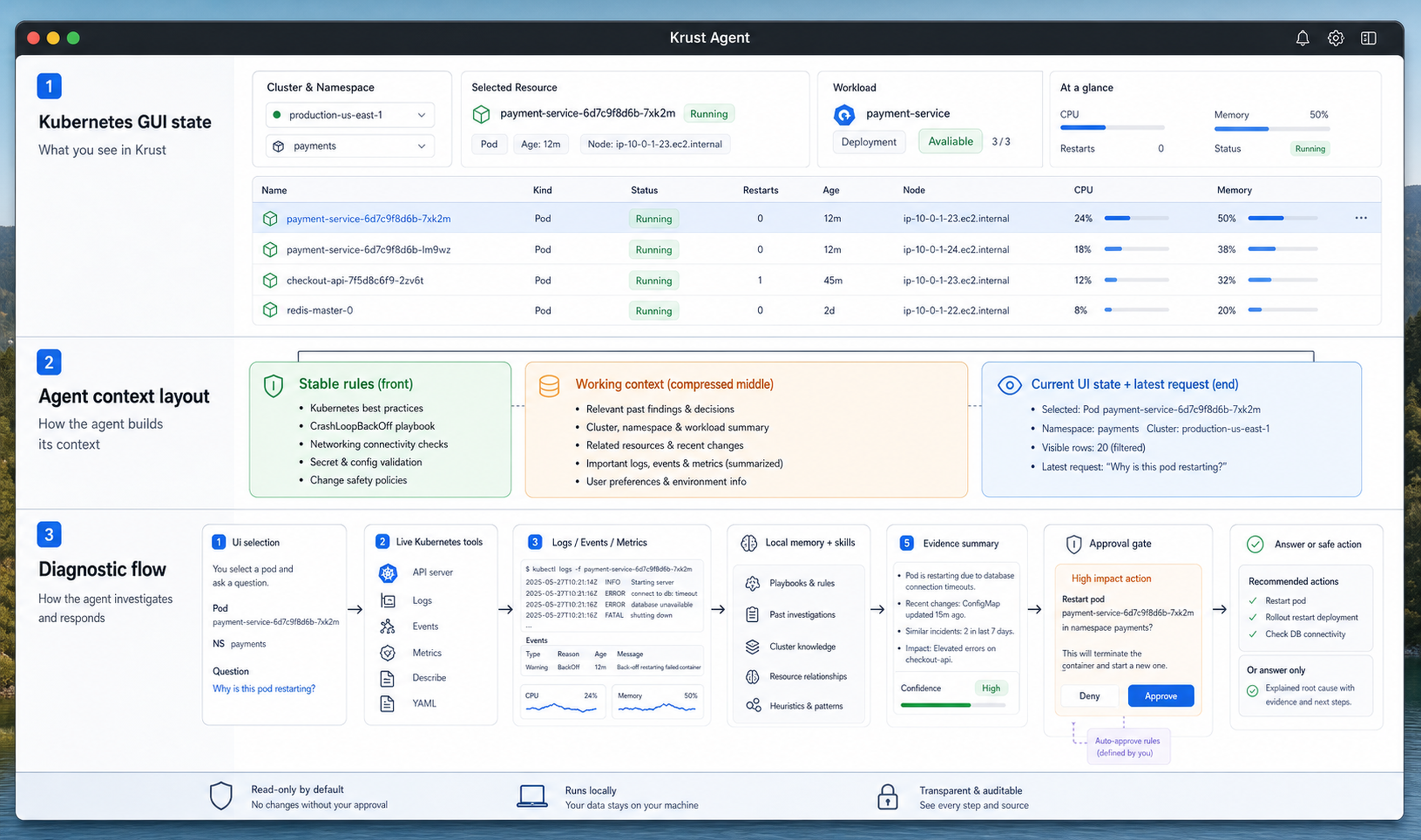
Krust Agent sits inside a Kubernetes GUI. That changes the context problem.
When an operator asks “why is this pod not ready?”, the useful context is not a long chat transcript. It is the current cluster, namespace, selected resource, visible table rows, recent events, logs, metrics, and the safety boundary before changing anything.
So Krust does not try to solve this by making the prompt bigger.
It keeps context in three places:
front: stable Kubernetes operating rules
middle: disposable working history
end: current UI state and latest user request
The goal is simple: live cluster evidence should beat stale conversation history.
Why a GUI Agent Needs Different Context
A coding agent can mostly reason from files, diffs, tests, and shell output.
A Kubernetes GUI agent needs app state:
- active cluster and namespace
- selected pod, deployment, service, or custom resource
- current search/filter state
- visible rows in the resource table
- recent events and logs
- Prometheus or metrics-server signals when available
- approval boundaries for restart, scale, patch, delete, or apply
That state changes quickly. A selected pod can change. A namespace filter can change. A warning event can become stale.
If the agent treats old context as current truth, it will diagnose the wrong thing.
Front: Stable Rules
The front of the prompt is for rules that should survive across turns:
- use fresh cluster evidence first
- treat memory as a hint, not proof
- ask before write operations
- be concise during incidents
- do not assume which resource the user means
In Krust, these rules live in base_instructions.md and stay above a cache boundary:
const BASE_INSTRUCTIONS: &str = include_str!("base_instructions.md");
const SYSTEM_PROMPT_CACHE_BOUNDARY: &str = "---- SYSTEM_PROMPT_CACHE_BOUNDARY ----";

p.push_str(BASE_INSTRUCTIONS.trim());
p.push_str("\n\n");
p.push_str(SYSTEM_PROMPT_CACHE_BOUNDARY);
This keeps durable behavior separate from per-turn state.
The design follows a practical long-context lesson: important instructions and current questions should not be buried in the middle. The Lost in the Middle paper showed that models can be weaker when relevant information sits deep inside a long context. OpenAI, Anthropic, and Google long-context guidance all point in a similar direction: keep the important query and instructions easy to find.
End: Current UI State
The end of the context is where Krust puts the freshest state.
Before the latest user message, Krust injects:
- current timestamp
- current permissions
- selected resource summary
- active UI context
- bounded memory recall
- available skills
- selected skill body, only when needed
The shape is:
old conversation history
dynamic context for this turn
latest user message
If the user is looking at checkout-api-7f... in payments-prod, the agent sees that close to the question. If the user switches to a different deployment, the next turn gets the new resource context.
That is the part that makes the agent feel attached to the GUI instead of floating beside it.
Middle: Keep It Disposable
The middle is where old tool output, earlier hypotheses, memory recalls, and loaded workflows accumulate.
Krust treats that area as working state, not sacred history.
Memory recall is capped:
let limit = if deep { 5 } else { 2 };

const MAX_TOTAL_CHARS: usize = 1500;
const MAX_CONTENT_CHARS: usize = 400;
The memory block also tells the agent how to use it:
Treat as hints; prioritize fresh cluster evidence.Large artifacts use pointers first. A CriticalReport is not pasted into every prompt. The agent gets an instruction to fetch it only when it needs the full report:
if ctx.kind == "CriticalReport" {
    out.push_str("- CriticalReport pointer only. Call get_critical_report before analyzing it.\n");
}
Skills follow the same rule. Krust shows lightweight skill metadata by default. The full SKILL.md loads only when the user names a skill or the workflow clearly needs it.
This keeps a pod triage task from carrying every runbook, every previous log snippet, and every old hypothesis at once.
Tools Stay Out of the Prompt When They Can
Krust has tools for resources, logs, events, Prometheus queries, memory, YAML, shell commands, and approval-gated mutations.
Those tool schemas can be large. When the provider supports native tool calling, Krust sends schemas through the API tools field instead of duplicating them as markdown inside the prompt:
if !dispatcher.should_send_tool_specs() {
    p.push_str(&build_tools_section(tools));
}
The prompt explains behavior around live infrastructure. The tool registry explains how to inspect or change it.
Keeping those separate reduces stale prompt bulk.
The Pattern
For a Kubernetes dashboard with an AI agent, this is the useful pattern:
1. Stable front
   identity, safety policy, operating rules

2. Disposable middle
   old turns, tool output, memory, loaded workflows

3. Fresh end
   current cluster, namespace, selected resource, UI state, latest request
That is the core of Krust Agent context design.
The agent should remember enough to be useful. But when a pod is failing now, the current cluster state has to win.