Argo CD has a resource tree. Kubernetes desktop apps have resource trees. Both can show YAML, logs, status, and health.
That surface similarity creates the wrong product question: “Should we use Argo CD or a Kubernetes GUI?”
For most teams, the answer is both. Argo CD should own the path from Git to the cluster. A Kubernetes operations app should own the path from a symptom to live evidence.
They overlap because both need to understand Kubernetes. They are not interchangeable because they start from different sources of truth.
The Short Version
| Job | Argo CD | Kubernetes operations GUI |
|---|---|---|
| Desired state | Git repository | Not the primary source of truth |
| Reconciliation | Core responsibility | Observes the result |
| Sync and drift | First-class | Useful integration point |
| Cross-application GitOps status | First-class | Usually secondary |
| Live resources across the cluster | Application-scoped | First-class |
| Events, logs, metrics, exec | Available, permission-dependent | Core debugging workflow |
| Arbitrary resource relationships | Application tree | Live topology and owner graph |
| Best question | “Does live match Git?” | “Why is production unhealthy?” |
Argo CD answers deployment-state questions exceptionally well. It is not meant to replace every operational view of the cluster.
What Argo CD Should Own
Argo CD’s model is declarative: compare desired manifests from Git with live state, then reconcile the difference.
The official automated sync documentation says Argo CD can sync when it detects a difference between Git and the cluster. Automatic pruning and self-healing are separate safety choices. By default, automated sync does not delete resources removed from Git, and live changes do not trigger self-healing unless those options are enabled.
This makes Argo CD the right place for:
- desired revision and source repository
- sync status and drift
- health across an Application
- sync waves and hooks
- ApplicationSets and generated Applications
- controlled prune and self-heal policy
- auditability through Git history
The Argo CD UI is also becoming broader. Its ApplicationSet UI includes list, tree, detail, Events, and preview views. The preview can show how edits would change generated Applications without saving those edits.
That is valuable GitOps context. It is still centered on what Argo CD manages.
What a Kubernetes Operations App Should Own
An incident rarely stays inside one Application status.
A Degraded Application may lead to:
- a Deployment whose new ReplicaSet never becomes available
- Pods stuck in
Pendingbecause of scheduling constraints - an image pull failure
- a Secret or ConfigMap reference that is missing
- a Service selector pointing at no ready Pods
- a PVC that cannot bind
- a node, network, DNS, or admission problem outside the Application boundary
The operational workflow has to move freely through live cluster state. That means browsing resources, following owner references and selectors, inspecting Events, streaming logs, checking metrics, viewing YAML, and opening a shell when permissions allow.
Argo CD can expose logs and exec through its RBAC model. Its RBAC documentation explicitly defines application-scoped logs and exec permissions. That is useful, but it remains an Argo CD application view of the cluster.
A general Kubernetes tool has a different responsibility: investigate anything the current Kubernetes identity can see, whether or not Argo CD owns it.
The Two Trees Are Not the Same
Argo CD defaults Application details to a tree and can also show pods, network, and list views. The tree explains resources as part of an Argo CD Application.
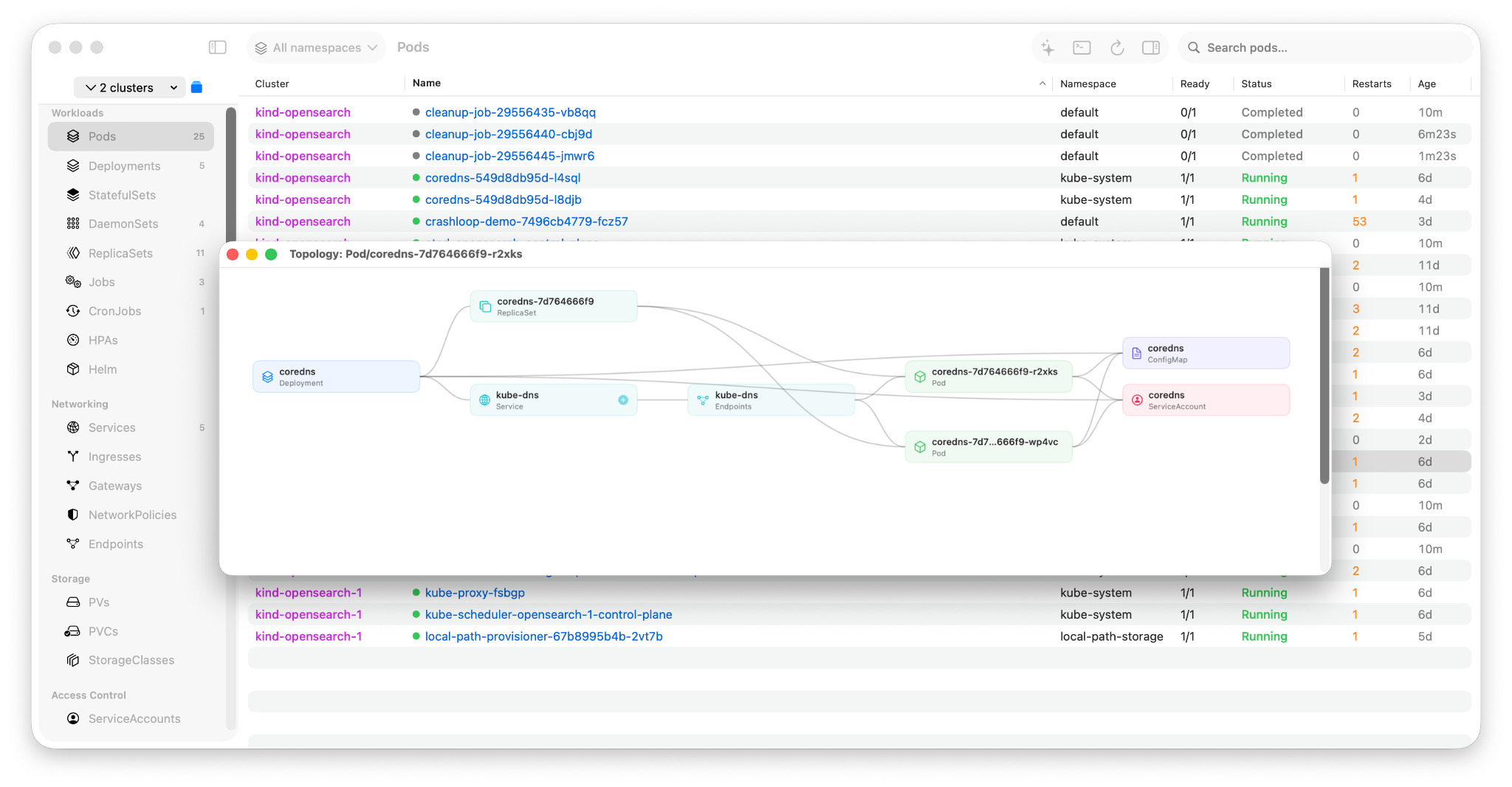
Krust topology starts from a live Kubernetes resource. It resolves relationships through:
ownerReferencesfor Deployment → ReplicaSet → Pod- label selectors for Service → Pod
- endpoint target references
- Pod references to ConfigMaps, Secrets, ServiceAccounts, and PVCs
That difference is useful during incidents. You may start with an unhealthy Deployment, a Service with no endpoints, or a Pod mounting the wrong configuration — not with the Argo CD Application itself.
Use the Argo CD tree to understand the GitOps application boundary. Use Krust resource topology to follow live Kubernetes relationships from the resource where the symptom appears.
A Healthy Division of Responsibility
A practical operating model looks like this:
- Git owns durable changes. Update the repository and let Argo CD reconcile.
- Argo CD owns sync policy. Use its status to understand drift, health, revisions, and reconciliation.
- Krust owns live investigation. Follow Events, logs, metrics, YAML, and topology until the failure is explained.
- Direct mutations stay exceptional. Restarting a workload or deleting a failed Pod can be a diagnostic or recovery action, but configuration fixes should normally return to Git.
This separation prevents a common failure mode: fixing production manually, watching it recover, and then having self-heal put the Git version back.
When Argo CD Alone Is Enough
Stay in Argo CD when the question is narrowly about:
- whether an Application is synced
- what revision is deployed
- which resources differ from Git
- whether a sync hook or wave failed
- what an ApplicationSet will generate
- whether to Sync, Refresh, or Roll Back
Its purpose-built UI is excellent for those questions.
When You Need the Live Cluster
Move into a Kubernetes operations workspace when:
- the Application is healthy but users still see errors
- the failing resource is shared by several Applications
- node, storage, DNS, networking, or admission behavior is involved
- you need continuous logs or metrics while state changes
- you need to compare namespaces or clusters
- the resource is not managed by Argo CD
That is not a failure of GitOps. It is the boundary between deployment control and operations.
The Product Position
Krust does not replace Argo CD. It makes Argo CD part of a wider native macOS investigation loop.
Krust recognizes Argo CD Applications as profiled custom resources, surfaces sync and health state, and provides Refresh, Sync, Sync with Prune, and terminate-operation actions. From there, you can move into the live workload, topology, Events, logs, metrics, YAML, or Agent without changing operating context.
The point is not to put another GitOps controller on your laptop. The point is to connect GitOps evidence with the rest of the cluster evidence.
See Krust features, resource topology, or the Krust vs Lens comparison.