Resource Topology
Free
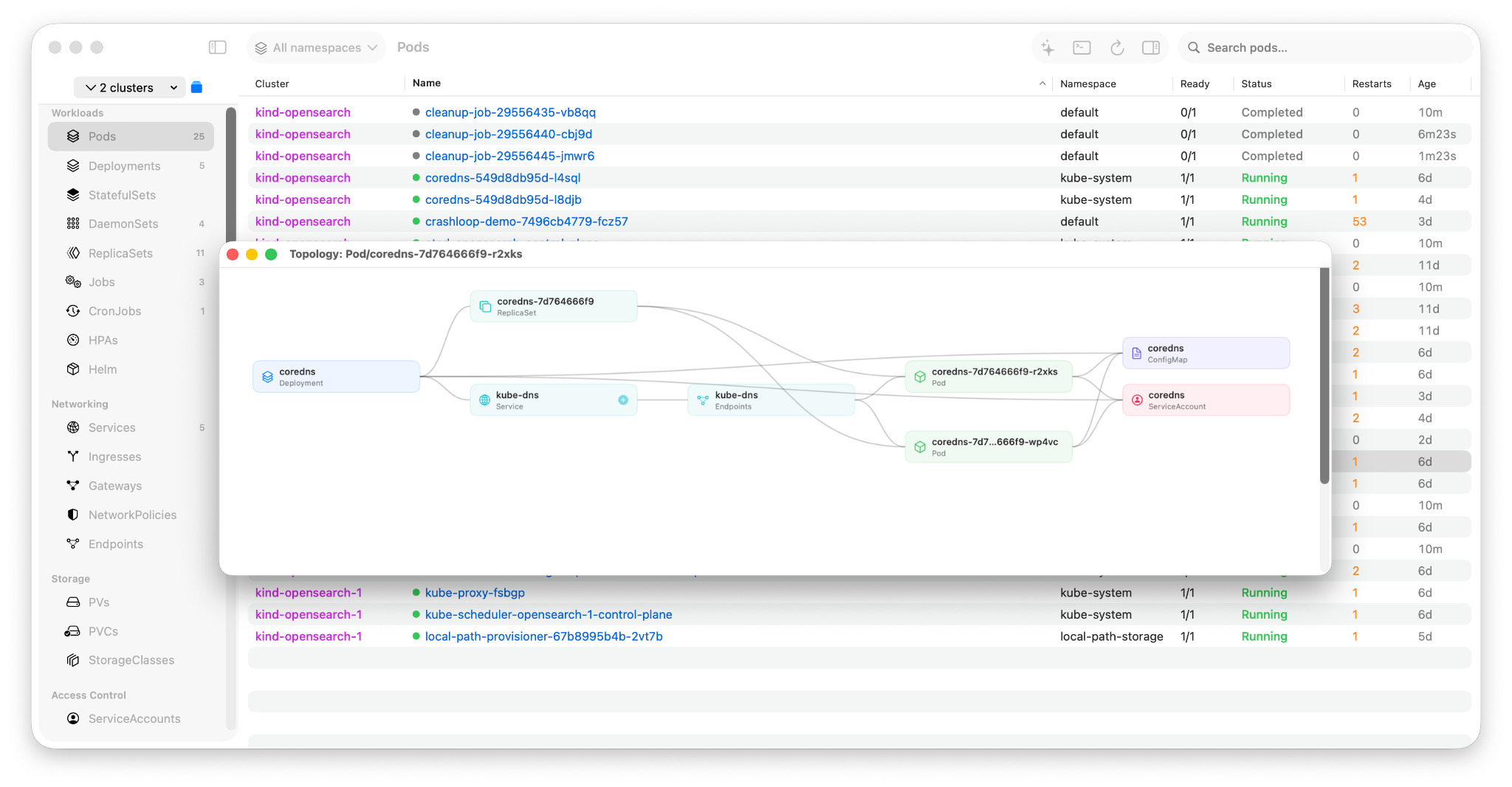
Visualize how your Kubernetes resources relate to each other in an interactive, ArgoCD-style horizontal tree graph.
Overview
The topology graph shows the dependency tree for any resource. Starting from a root resource (e.g., a Deployment), Krust discovers all related resources — ReplicaSets, Pods, Services, Endpoints, ConfigMaps, Secrets, ServiceAccounts, PVCs — and renders them as a left-to-right tree with bezier curve edges.
Use Topology as an Investigation Path
Each relationship answers a different question. Ownership edges explain rollout and lifecycle. Service selectors and Endpoints explain traffic. Pod spec references explain configuration, identity, and storage dependencies.
Start from the resource named by the symptom and expand only the path you need. A missing edge can be evidence: a Service with no selected Pods points toward selectors or readiness, while a Pod without an expected Secret reference points back to its live specification.
Read Kubernetes Resource Topology: Trace the Failure Path for Service, rollout, and Pod dependency examples.
Supported Root Resources
You can open a topology graph from the context menu of these resource types:
- Deployments — shows ReplicaSets, Pods, Services, Endpoints, ConfigMaps, Secrets, ServiceAccounts, PVCs
- StatefulSets — shows Pods, Services, Endpoints, PVCs, ConfigMaps, Secrets, ServiceAccounts
- DaemonSets — shows Pods, Services, ConfigMaps, Secrets, ServiceAccounts
- Services — shows Endpoints and target Pods
- Pods — shows ConfigMaps, Secrets, ServiceAccounts, PVCs referenced by the pod spec
- Jobs — shows Pods, ConfigMaps, Secrets, ServiceAccounts
- CronJobs — shows Jobs, Pods, and related resources
- Gateways — shows the GatewayClass, attached HTTPRoutes and GRPCRoutes, and their backend Services
- Roles, ClusterRoles, RoleBindings, ClusterRoleBindings, and ServiceAccounts — open an RBAC graph of subjects, bindings, roles, and rules
How to Use
- Right-click a supported resource in its list view
- Select Visualize Topology from the context menu
- A new window opens with the topology graph
Interacting with the Graph
Drag nodes
Click and drag any node to reposition it. Connected edges follow the node automatically.
Expand nodes
Nodes with a + button can be expanded to discover their own child resources. Click the + button to fetch and add child resources to the graph. A loading spinner shows while the API call is in progress.
Node types
Each node is color-coded by resource kind:
- Deployment — blue
- StatefulSet — purple
- DaemonSet — cyan
- ReplicaSet — mint
- Job — yellow
- CronJob — orange
- Pod — green
- Service and Endpoints — teal
- ConfigMap — indigo
- Secret — red
- ServiceAccount — pink
- PVC — brown
Multi-Cluster Support
When using multi-cluster mode, the topology graph fetches resources from the correct cluster context. The window title shows both the resource kind and name (e.g., "Topology: Deployment/metrics-server-v1.33.0").
Technical Details
Topology discovery is implemented in the Rust core using the Kubernetes API. It resolves relationships through:
- ownerReferences — parent-child relationships (Deployment→RS→Pod)
- Label selectors — Service→Pod matching
- Endpoints — the Service's Endpoints object, shown next to its Pods
- Pod spec references — volume mounts (ConfigMap, Secret, PVC), serviceAccountName
The graph uses a DAG-to-tree conversion (BFS depth, deepest-parent wins) to ensure clean visualization even when resources have multiple parents.