Krust AI for Kubernetes: evidence-first diagnostics
Krust AI is the Agent workflow inside Krust, the native Kubernetes operations app for macOS. It diagnoses pods, logs, events, YAML, metrics, and incidents with your own provider account.
For engineers evaluating an AI Kubernetes dashboard, Krust AI is the investigation layer inside the broader Krust desktop app, not a separate dashboard product.
Short answer: Krust AI is a Kubernetes AI diagnostics agent built into Krust. It can inspect cluster resources, read logs, explain errors, recall past incident notes, and suggest fixes while keeping write actions behind explicit approval.

Overview
The Krust AI diagnostic agent (Krust Agent in the app) is a chat inspector you open from the toolbar AI Assistant menu or with Cmd+Shift+A. It can call Kubernetes tools to diagnose issues, explain errors, read logs, inspect YAML, and suggest fixes. It is separate from the base product workflow: Krust remains fully usable for navigation, logs, diff, and terminal work without enabling AI.
What Krust AI can diagnose
- CrashLoopBackOff, OOMKilled, ImagePullBackOff, and scheduling failures.
- Pod logs, events, rollout state, and resource configuration drift.
- RBAC, security audit findings, missing limits, and risky workload settings.
- Recurring incidents using local persistent memory.
How Krust AI follows the evidence
- Identify the selected resource, cluster, namespace, and current state.
- Collect read-only evidence from related resources, events, logs, YAML, and available metrics.
- Explain which signals support the likely cause and separate them from assumptions.
- Suggest the next safe check or action; write operations remain behind explicit approval.
See the same evidence sequence applied to CrashLoopBackOff, a Service with no endpoints, and RBAC delete permission.
Available Tools
The agent has about 30 built-in tools. The Kubernetes tools are generic, so they work with any resource type, including CRDs. Plugins and MCP servers can add more tools and skills (see Plugins, MCP, and skills).
Read-Only (auto-execute)
get_resource— List, get, describe, or YAML for any resource. SupportsfieldSelector,labelSelector, and JSONPath for precise field extraction.grep_resource— Regex search within resource YAML or pod logs.logs— Fetch logs from pods, deployments, jobs, or cronjobs.explain_resource— Discover API schema and fields for any resource type. Essential for CRDs.get_eventsandget_critical_report— Read cluster events and Krust Critical Reports.- Prometheus tools — Instant and range queries, metric and metadata discovery, and scrape targets through the Prometheus connection configured in Settings → Observability.
- UI tools — Read what the Krust window shows and the current selection, navigate to a tab, apply search filters (
filter_resources), and switch contexts or namespaces. render_chartandpresent_image— Show charts and images in the conversation.list_port_forwardsandload_skill— List active port forwards and load a skill's instructions.memory— Persistent memory: store, recall, or forget diagnostic findings across sessions.
Write (requires approval)
delete_resource— Delete any resource with optional grace period.mutate_resource— Restart, scale, cordon, uncordon, or drain.pod_exec— Run a non-interactive command in a container.port_forwardandstop_port_forward— Start or stop a port forward.shell— Run a command on your Mac in a restricted macOS sandbox.http_request— Run an OpenSearch request through a connection saved in Krust, without exposing its credentials.apply_manifest— Create or update resources from YAML manifests (opt-in).patch_resource— Merge, strategic, or JSON patch with optional dry-run (opt-in).
Human-in-the-Loop
Safety is built into the agent workflow:
- Read operations execute automatically
- Write operations require explicit user approval via an approval card
- Tool permissions — turn individual tools on or off, and opt in to the edit tools (
apply_manifest,patch_resource), in Settings > AI > Tool permissions… - Plugin approval policies can allow or require approval based on a tool's arguments, with per-plugin overrides
- Stop button cancels the AI mid-turn at any point
Plugins, MCP, and skills
- Plugins — install and update plugins from the official marketplace in Settings > Plugins. A plugin can bring tools, skills, and saved connections; Krust keeps the plugin credentials.
- MCP servers — connect local (command) or remote (URL) MCP servers, including servers that sign in with OAuth.
- Subagents — the agent can hand parts of a deeper investigation to subagents and combine their results.
Persistent Memory
The agent remembers past incidents across sessions:
- SQLite database with FTS5 full-text search
- Can save and search notes about your cluster
- Recalls past diagnostics and resolutions automatically
Right-Click AI
Right-click any log line and select "Explain with AI" for instant analysis of errors and warnings.
Why use AI inside a Kubernetes dashboard?
Generic chat tools need pasted logs and guessed context. Krust AI can use the same resource model, logs, events, and YAML that the dashboard already has open, so diagnostics stay closer to the failing workload.
Supported Providers
Bring your own provider account. Krust does not bundle model access. Your provider choice and credentials stay under your control.
- Anthropic (Claude) — API key
- Vertex AI (Claude) — Claude models on Google Cloud, with a region setting
- Gemini (Google) — API key
- OpenAI (GPT) — API key
- OpenAI Codex — sign in with your ChatGPT account instead of an API key
- Ollama (local models)
- Custom providers — add any endpoint compatible with the OpenAI Responses API, with its own base URL
Setup
- Open Settings → AI
- Select a provider and model
- Enter the API key when the provider asks for one, or complete ChatGPT Login for OpenAI Codex
Claude Code in Krust
If you already use Claude Code, Krust can open it in the bottom terminal panel with the cluster and resource you are looking at. Claude Code uses its own login and model access; Krust does not need an API key for it.
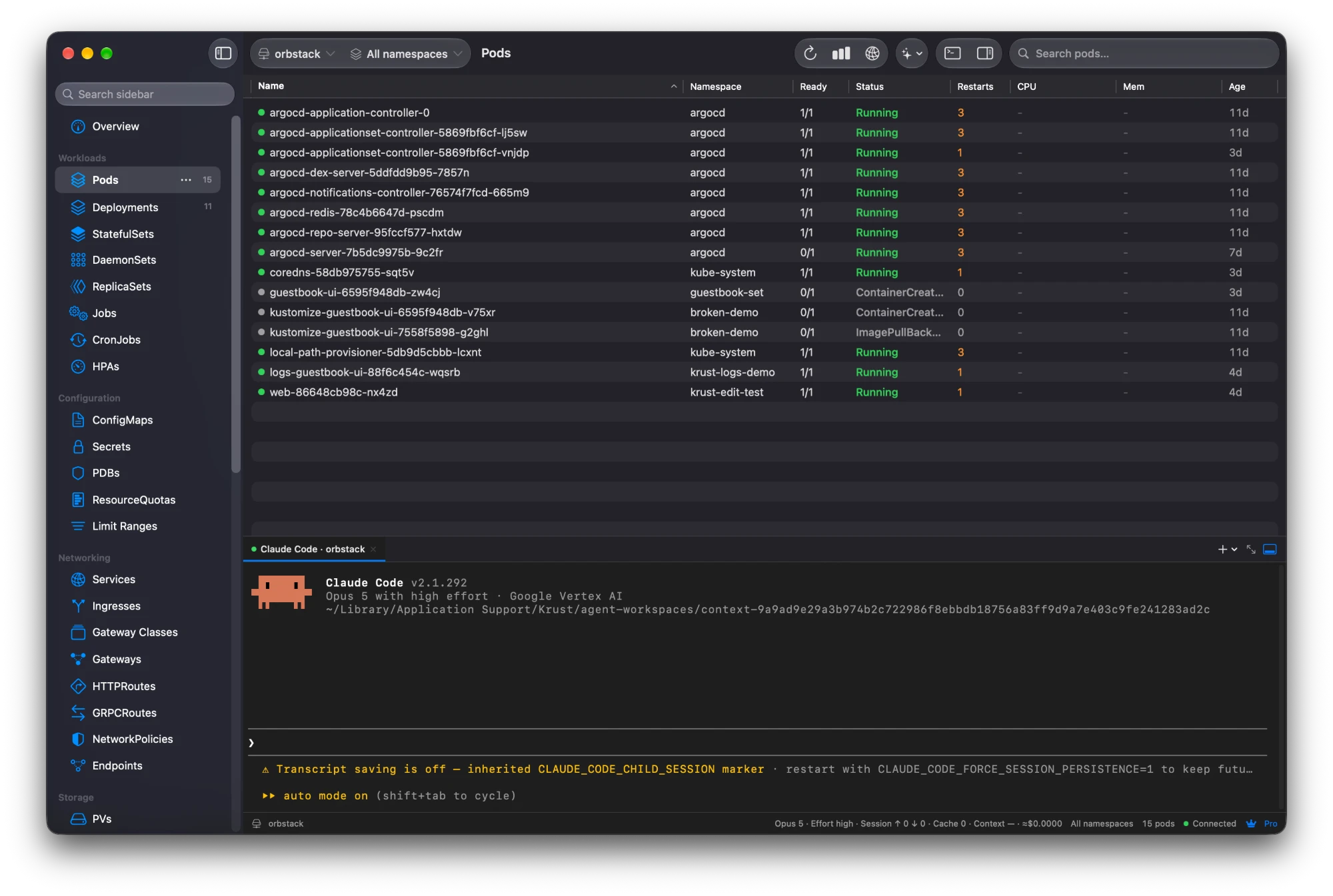
Open a session
- Toolbar: AI Assistant menu → Claude Code, for the current cluster
- Resource: right-click a row → Ask with External Agent → Claude Code, or use the same menu in the inspector
- Terminal panel: + → New Claude Code Session starts a fresh conversation in a new tab next to your shells
The claude CLI must be installed. Krust launches it through your login shell, so your PATH and shell configuration apply.
What the session gets
- Scoped cluster access:
KUBECONFIGpoints at the chosen context, sokubectlruns against the cluster you opened it from. Claude Code is told to ask before any change to the cluster. - The
krustMCP server: session context plus the live state of the Krust window, read-only Kubernetes, event, log, and Prometheus tools, and agent memory. Write tools such as apply, patch, delete, and exec are not exposed; they stay behind Krust's approval flow. - Plugin skills: skills and tools from your enabled Krust plugins. Krust keeps the plugin credentials; Claude Code never sees them.
- Resume: each cluster gets its own workspace, and reopening the same resource resumes its last Claude Code conversation.
- Status bar: model, effort, session tokens, cache, context usage, and estimated cost.