Security Audit
Separate Kubernetes configuration findings, effective RBAC exposure, and optional Trivy results before deciding what to remediate.
Overview
Krust includes a built-in security audit engine that evaluates live cluster resources against explicit security configuration checks. Results are presented in one view with severity, source, affected resource, and a remediation direction.
Optional Trivy integration is a separate evidence source. Krust runs a locally installed trivy executable and parses its Kubernetes or image scan output. Krust does not bundle Trivy, and a missing or failed Trivy run must not be interpreted as a clean scan.
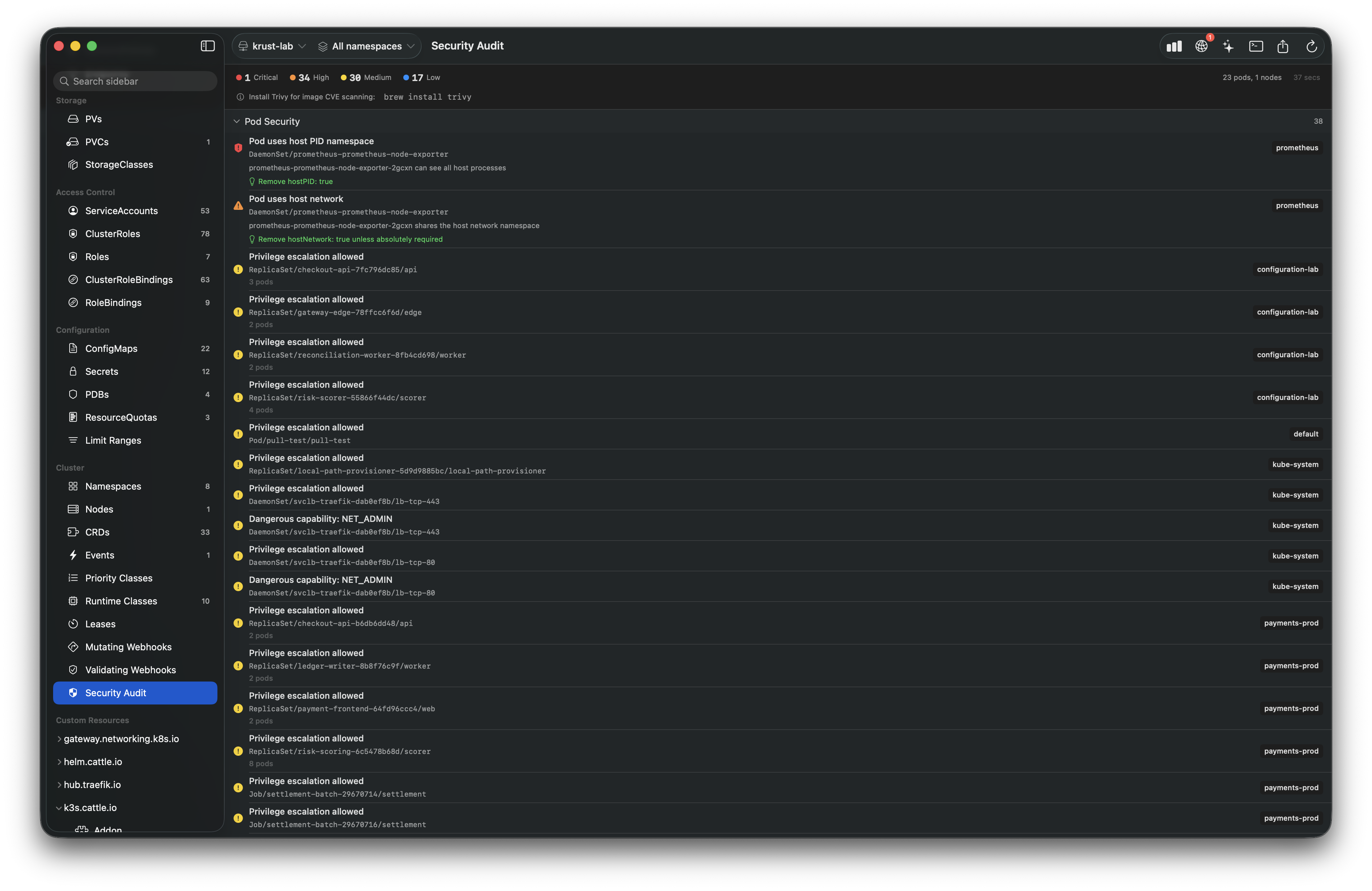
How to Use
Navigate to the Security Audit tab in the sidebar. Krust automatically starts the built-in audit for a selected namespace scope. For All Namespaces, start the audit explicitly so a large cluster does not begin an expensive scan without intent. Findings are sorted by severity and grouped by category, with counts for each severity at the top.
- Right-click a finding to Dismiss it once reviewed; the dismissed-rules menu shows, restores, or clears dismissals.
- Export saves the findings as a SARIF file.
- Right-click a finding and choose Add to AI Chat to send it to the Agent with its resource context.
- When Trivy is installed, the Trivy menu runs Scan Images (CVE), Scan Configs (CIS), or Scan All.
Built-In Audit vs Trivy
| Source | Best for | Requirement |
|---|---|---|
| Krust built-in audit | Workload security context, image tags, RBAC, service accounts, and secret exposure | Current Kubernetes access through kubeconfig |
| Trivy cluster scan | Vulnerabilities, misconfigurations, and secret findings across a selected cluster or namespace | Local Trivy installation and sufficient cluster permission |
| Trivy image scan | Package-level vulnerability detail for a selected image | Local Trivy installation and image access |
Install Trivy with brew install trivy, then verify its status under Settings → Security. Scan mode, severity, scanners, timeout, namespace scope, and unfixed-vulnerability handling remain explicit settings.
Check Categories
The built-in audit evaluates Pods, RBAC, ServiceAccounts, and ConfigMaps. Pods owned by the same ReplicaSet, StatefulSet, DaemonSet, Job, or CronJob are checked once and reported against the owner with an affected-Pod count. Init containers are skipped by the Pod and image checks.
Pod Security
Checks related to pod-level and container security context.
| Check | Severity | Description |
|---|---|---|
| Privileged container | Critical | Containers running with privileged: true |
| Host PID namespace | Critical | Pods with hostPID: true |
| Host network | High | Pods with hostNetwork: true |
| Host IPC namespace | High | Pods with hostIPC: true |
| Container runs as root | High | Containers with runAsUser: 0 or runAsNonRoot: false |
| Dangerous capability | High / Medium | Containers that add ALL or SYS_ADMIN (High), or NET_ADMIN, SYS_PTRACE, or NET_RAW (Medium) |
| Privilege escalation allowed | Medium | Non-privileged containers without allowPrivilegeEscalation: false |
| Writable root filesystem | Low | Containers without readOnlyRootFilesystem: true |
Image Security
Checks related to container image hygiene.
| Check | Severity | Description |
|---|---|---|
| Image uses :latest or no tag | Low | Images using the :latest tag or no tag, unless pinned by digest (@sha256:...) |
RBAC Permissions
Checks for overly broad RBAC policies. Findings name the subject, binding, and role that grant the permission; system: subjects are skipped.
| Check | Severity | Description |
|---|---|---|
| Cluster admin binding | High | ClusterRoleBindings or RoleBindings that bind the cluster-admin ClusterRole |
| Secret read access | High | Rules granting get, list, or watch on secrets |
| Pod exec or attach | High | Rules granting pods/exec, pods/attach, or pods/portforward |
| Permission management | High | Rules granting bind, escalate, impersonate, or write access to RBAC resources |
| Wildcard permissions | Medium | Rules granting * verbs on * resources |
Service Account
Checks related to service account configuration.
| Check | Severity | Description |
|---|---|---|
| Default SA auto-mounts token | Medium | The default ServiceAccount in a namespace auto-mounts API tokens into Pods that don't name a service account |
Secret Exposure
Checks for credentials exposed through environment variables or ConfigMaps.
| Check | Severity | Description |
|---|---|---|
| Secret in env var | Medium | Containers that read a Secret into an environment variable |
| ConfigMap has sensitive key | Low | ConfigMap keys that look like credentials, such as password, token, api_key, or private_key |
Severity Levels
| Level | Meaning |
|---|---|
| Critical | Immediate security risk that should be addressed urgently |
| High | Significant security concern that could lead to exploitation |
| Medium | Best-practice violation that weakens security posture |
| Low | Minor improvement opportunity for defense in depth |
| Info | Informational result with no direct risk |
From Finding to Fix
- Confirm the context, namespace, scan source, and scope.
- Open the affected resource and verify the exact field, rule, package, or binding behind the finding.
- Trace Pods to their owning workload and RBAC rules to the binding and subject that receive them.
- Review the YAML or image change in the durable deployment source.
- Deploy, then rerun the same audit scope and confirm the finding is gone.
Use Kubernetes Security Audit: Configuration First, Trivy Second for prioritization guidance and common failure modes.