YAML Editor & Diff
Edit live resources, review diffs, and compare revisions without leaving the Kubernetes context you are debugging.
Editor
Krust opens standalone editor windows for any Kubernetes resource. The editor is powered by STTextView and includes:
- Full YAML syntax highlighting
- Line numbers
- Cmd+F find bar for searching within the document
- Apply changes directly to the cluster with Cmd+S
- Diff (Cmd+D) to review unapplied changes, Dry Run to validate them on the server, and Reload to fetch the live object
Each resource opens in one editor window; choosing Edit YAML again brings that window forward. Krust asks before closing or reloading a window with unapplied changes. To edit decoded Secret or ConfigMap values instead of base64 YAML, use the data editor in the Data section of the Secret or ConfigMap inspector.
The editor is designed for operational patches and inspections, not as a replacement for GitOps. Use it when you need to understand current live state, apply a small tactical change, or verify what the API server accepted.
Apply Flow
- Open a resource with Edit YAML from the context menu, or press E in a resource table.
- Make a focused YAML change in the editor window.
- Press Cmd+S to apply the update to the cluster the resource came from.
- If Kubernetes rejects the change, Krust shows the validation error inline so you can correct it without losing the editor state.
Apply sends only the fields you changed, like kubectl edit. Fields changed on the server in the meantime (for example replicas scaled by an HPA) are not reverted. If someone changed a field you also edited, Krust stops and asks you to reload. Applied objects are marked with the krust.io/edited annotation, so label selectors and IaC drift checks are unaffected.
Keep changes small and explicit. For large application changes, push through your normal deployment or GitOps path and use Krust to inspect the result.
Revision Diff Free
Compare previous revisions of workload resources to see exactly what changed:
- Compare ReplicaSets of a Deployment
- Compare ControllerRevisions of a StatefulSet
- Compare Helm release values with the previous revision
- Myers diff algorithm with colored additions and deletions
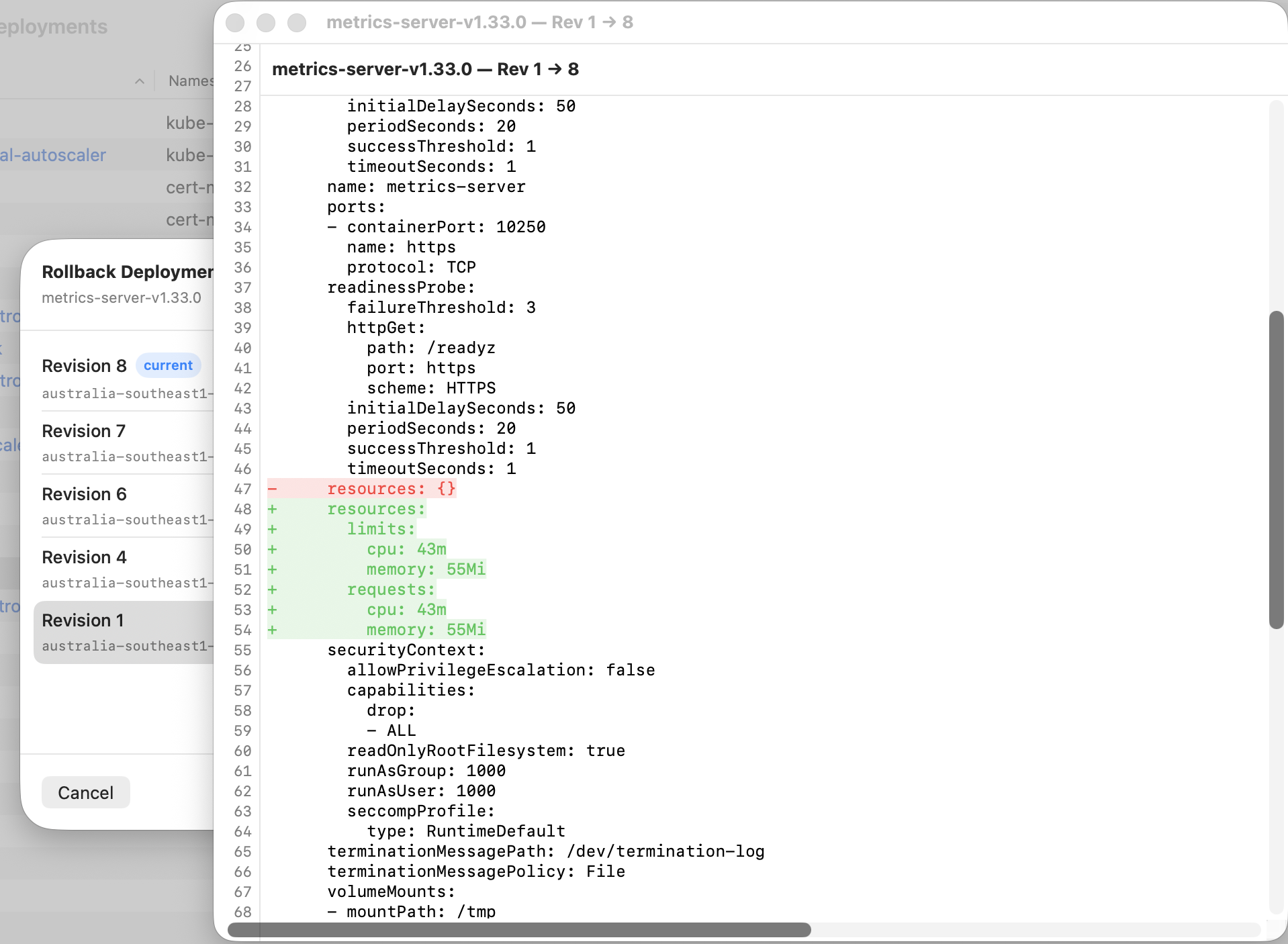
Rollback dialog with inline revision diff — red lines removed, green lines added between revisions.
Argo CD manifests
Argo CD (since 1.6): the API workspace adds live-versus-desired comparisons and persistent manifest panels. This differs from comparing two Kubernetes resources or workload revisions. Viewing a manifest is read-only; syncing or rolling back is a separate confirmed action. Read the Argo CD guide →
Resource Diff
Compare resources side-by-side with context-aware gating:
- Same-context diff is Free (normal review workflow)
- Cross-cluster diff (different contexts) is Pro (incident workflow)
- Colored unified diff showing additions and deletions
Same-context diff is useful for normal review work. Cross-cluster diff is aimed at incident response, where you need to compare production and staging or two regional clusters quickly.
Choose the Comparison That Matches the Question
| Comparison | Use it for |
|---|---|
| Two resources in one context | Peer configuration, policy, or workload differences |
| Two contexts | Staging-production drift or regional rollout differences |
| Workload revisions | The Pod template change that introduced a rollout failure |
| Helm revision values | Input changes between release revisions |
A diff shows what changed; Events, logs, metrics, and rollout state determine whether that change explains the incident. Read Kubernetes YAML Diff: Compare Live State Before Rollback for a complete review workflow.
Common Use Cases
- Rollback review — inspect what changed between workload revisions before restoring an older version.
- Live-state inspection — compare current API state with what you expected from manifests or Helm values.
- Small operational patches — fix a label, annotation, replica count, or config reference while staying inside the active context.