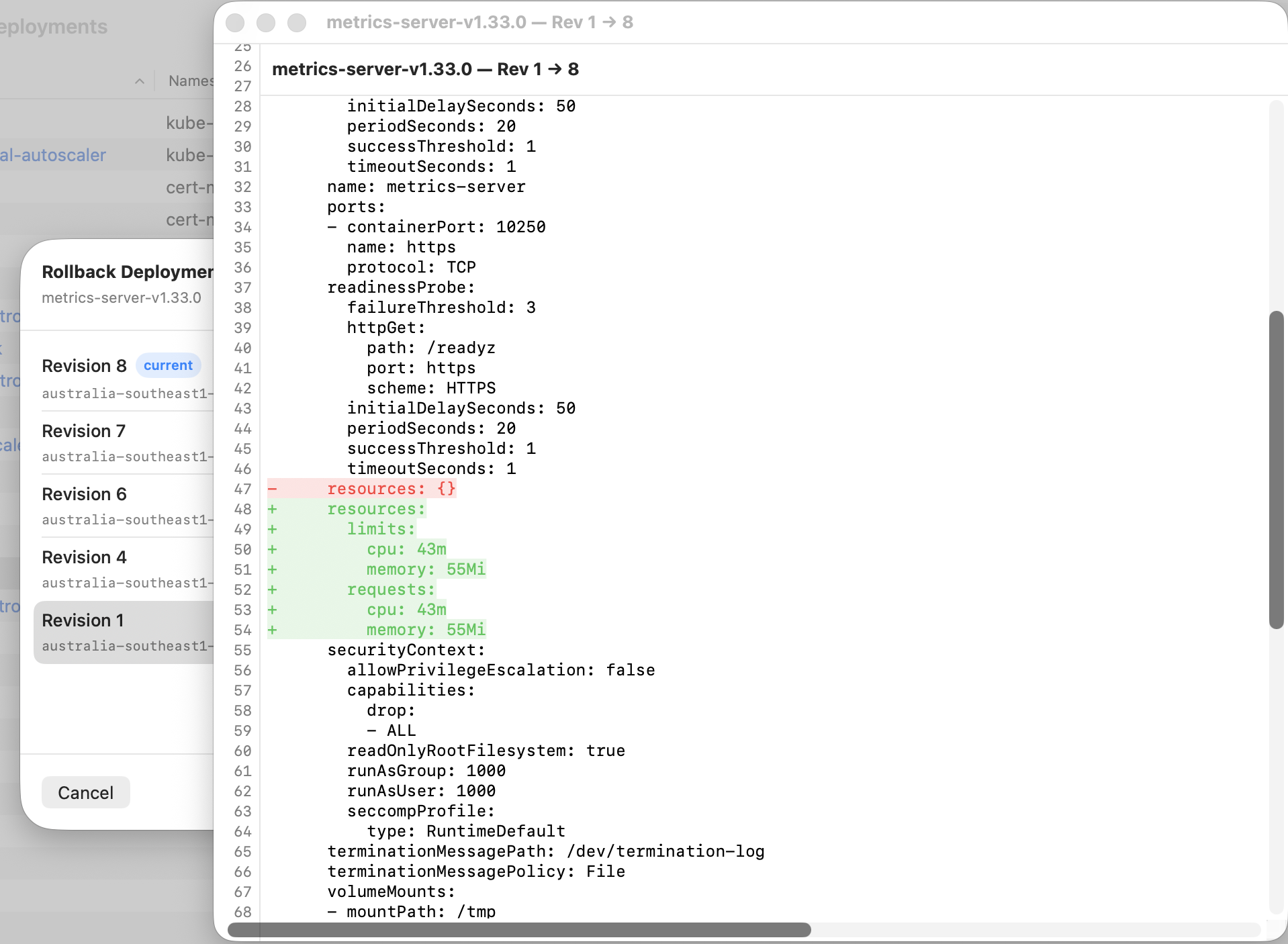
“Production differs from staging” is not yet a useful diff. Kubernetes objects contain generated fields, controller state, defaults, and metadata that can bury the one change that matters.
Choose the comparison that matches the question: live object versus live object, current workload revision versus previous revision, Helm values versus Helm values, or desired configuration versus live state. Then act only on the fields that explain the symptom.
TL;DR
- Confirm both context labels before comparing anything.
- Choose the correct pair: peer resources, workload revisions, Helm revisions, or desired versus live.
- Ignore generated status and metadata unless they are the evidence you need.
- Read additions and deletions together with rollout state, Events, logs, and metrics.
- Use the diff to explain the incident before selecting Apply or Rollback.
- Put durable changes back in Git or the deployment source.
A diff tells you what changed. It does not prove which change caused the incident.
Which Kubernetes diff are you actually asking for?
There are four common comparisons, and they are not interchangeable.
| Comparison | Best question |
|---|---|
| Resource A vs Resource B in one context | Why do two replicas, Services, or policies behave differently? |
| Production vs staging | What cluster-specific drift exists? |
| Current vs previous workload revision | What changed in the rollout that introduced the symptom? |
| Desired manifest vs live resource | What did the API server, controller, or manual action change? |
kubectl diff compares a proposed configuration with the live object. A revision diff compares controller history. Cross-cluster resource diff compares two live objects. Use the right one before interpreting the output.
How do you reduce YAML noise?
Raw live objects often include fields that are expected to differ:
resourceVersionuidcreationTimestamp- managed fields
- status conditions and observed generations
- cluster-assigned addresses
- controller-generated labels or annotations
Do not delete evidence blindly. Status may be the reason you opened the diff. Instead, decide which layer matters:
- Spec drift: image, environment, probes, resources, selectors, volumes.
- Metadata drift: labels and annotations consumed by Services, policy, or automation.
- Status difference: readiness, available replicas, conditions, assigned node or address.
- Ownership difference: controller or revision responsible for the object.
A smaller semantic question produces a more useful visual diff.
Rollout failure: compare revisions before rollback
Suppose a Deployment becomes unavailable after a rollout.
First identify the current and previous ReplicaSets. Then compare the Pod template fields:
- container image and digest
- command and arguments
- environment and referenced Secrets or ConfigMaps
- readiness, liveness, and startup probes
- CPU and memory requests or limits
- volume mounts
- service account
- labels used by Services or policies
Correlate the diff with evidence from the new Pods. FailedMount makes a changed volume reference relevant. OOMKilled makes a changed memory limit relevant. An empty EndpointSlice makes changed labels or selectors relevant.
Rollback is a recovery operation, not a root-cause statement. Keep the diff so the durable fix can be made in the deployment source.
Cross-cluster diff: staging and production are allowed to differ
The goal is not zero difference. Clusters often need distinct:
- replica counts
- domains and certificates
- storage classes
- node selectors and topology constraints
- resource sizing
- external endpoints
- environment-specific Secrets
Classify differences before escalating them:
- Expected environment override — documented and intentional.
- Version drift — one cluster has not received the same release.
- Manual live change — state differs from the deployment source.
- Controller default — the API or controller populated a field.
- Incident clue — the difference maps directly to the failing behavior.
This prevents a cross-cluster diff from turning into a long list of harmless environment noise.
The multi-cluster workflow shows how to keep context explicit while comparing rollouts and events.
Helm values are not the complete live object
Helm revision values explain input changes, but templates, chart versions, defaults, hooks, and post-rendering can also change the resulting resources.
For a failed Helm upgrade:
- compare chart and app versions
- compare values between revisions
- inspect the rendered workload and its revision
- read Events and logs from the failed resources
- confirm what rollback will restore
Use the Helm rollback guide for the full release workflow.
Editing live YAML without losing the source of truth
A live edit can be appropriate for a focused recovery action or for proving a hypothesis. Keep it small and explicit.
Before applying:
- confirm context, namespace, kind, and name
- inspect the diff
- understand whether GitOps or another controller will revert the change
- preserve the previous value
- know how you will verify the result
After applying:
- read the API validation response
- watch the new generation or revision
- inspect Events and rollout state
- verify the symptom changed
- move the durable fix to Git, Helm values, or the owning system
Kubernetes Server-Side Apply tracks field ownership. Conflicts can be evidence that another manager owns the field you are trying to change. Do not force ownership without understanding the other manager.
How Krust keeps comparisons explicit
Krust provides separate workflows for:
- editing a selected live resource with syntax highlighting and line numbers
- comparing two resources in the same context
- comparing resources across contexts
- comparing Deployment ReplicaSets
- comparing StatefulSet ControllerRevisions
- comparing Helm values between revisions
Same-context resource diff and workload revision diff are part of the free baseline. Cross-context diff is a Pro incident workflow because it coordinates two cluster identities and live objects.
Every comparison should show enough identity to verify both sides. If two clusters contain Deployment/api in production, the context names are not optional labels; they are part of the evidence.
See YAML Editor and Diff for the exact product workflows.
Common wrong moves
- Diffing two unlabeled contexts: you can fix the wrong cluster confidently.
- Treating all generated fields as drift: many are normal API or controller output.
- Rolling back before reading Events: the failure may be external to the revision.
- Editing a GitOps-managed object as the durable fix: reconciliation can restore the old value.
- Forcing Server-Side Apply ownership: first identify the current field manager.
- Comparing only Helm values: the rendered live resource may explain more.
FAQ
Is kubectl diff the same as comparing two live resources?
No. kubectl diff previews differences between a proposed configuration and the live object. A peer or cross-cluster diff compares two existing objects.
Should status be removed from every Kubernetes diff?
No. Ignore status when the question is desired spec drift. Keep it when comparing health, readiness, controller observation, or assigned runtime state.
Does rollback restore ConfigMaps and Secrets?
Not necessarily. Workload revision history primarily tracks the Pod template. External resources may have changed independently, so inspect every referenced dependency involved in the failure.