Kubernetes Port Forwarding with Stable Service URLs on macOS
Krust lets local tools keep Kubernetes-style service hostnames during port-forward workflows, so you do not have to rewrite apps, callbacks, scripts, and API clients to random localhost ports.
Short version: Krust scopes DNS to svc.cluster.local, cluster.local and short .svc names such as broker.kafka.svc, answers from active port-forward mappings, and leaves public DNS on the normal macOS resolver path.
The Problem with Plain kubectl port-forward
kubectl port-forward is useful, but it exposes a workload as localhost:<port>. That creates friction when a local app, webhook callback, Postman collection, browser bookmark, or test script expects a stable Kubernetes service URL.
The common workaround is to keep rewriting URLs. That works for one service, then gets messy once several internal APIs, dashboards, and databases are open at the same time.
What Krust Adds
Krust combines one-click port forwarding with scoped cluster-local DNS. Instead of forcing every local tool to know a new localhost port, Krust can keep service-style hostnames usable from macOS.
| Workflow | Plain port-forward | Krust stable URL workflow |
|---|---|---|
| Local URL shape | localhost:18080 | api.default.svc.cluster.local |
| DNS scope | None | svc.cluster.local, cluster.local and short .svc names |
| Public DNS | Normal macOS resolver | Normal macOS resolver |
| Multiple services | Manual port tracking | Pro: multiple concurrent DNS mappings |
| Restart recovery | Restart command manually | Auto-reconnect where possible |
How It Works
- Set up Local Routing once in Settings › Local Routing and approve the network extension in System Settings.
- Start a port forward from a Pod, Service, Deployment, StatefulSet, or DaemonSet and choose the DNS hostname route.
- Krust maps the forward to its real cluster name and port (see Which Name a Forward Gets).
- The Transparent Proxy network extension (listed in System Settings as Krust Packet Tunnel) scopes
svc.cluster.local,cluster.localand short.svcnames lookups to Krust. - The local DNS listener answers from the active mapping snapshot.
- Traffic reaches the local port-forward path while unrelated DNS stays outside Krust.
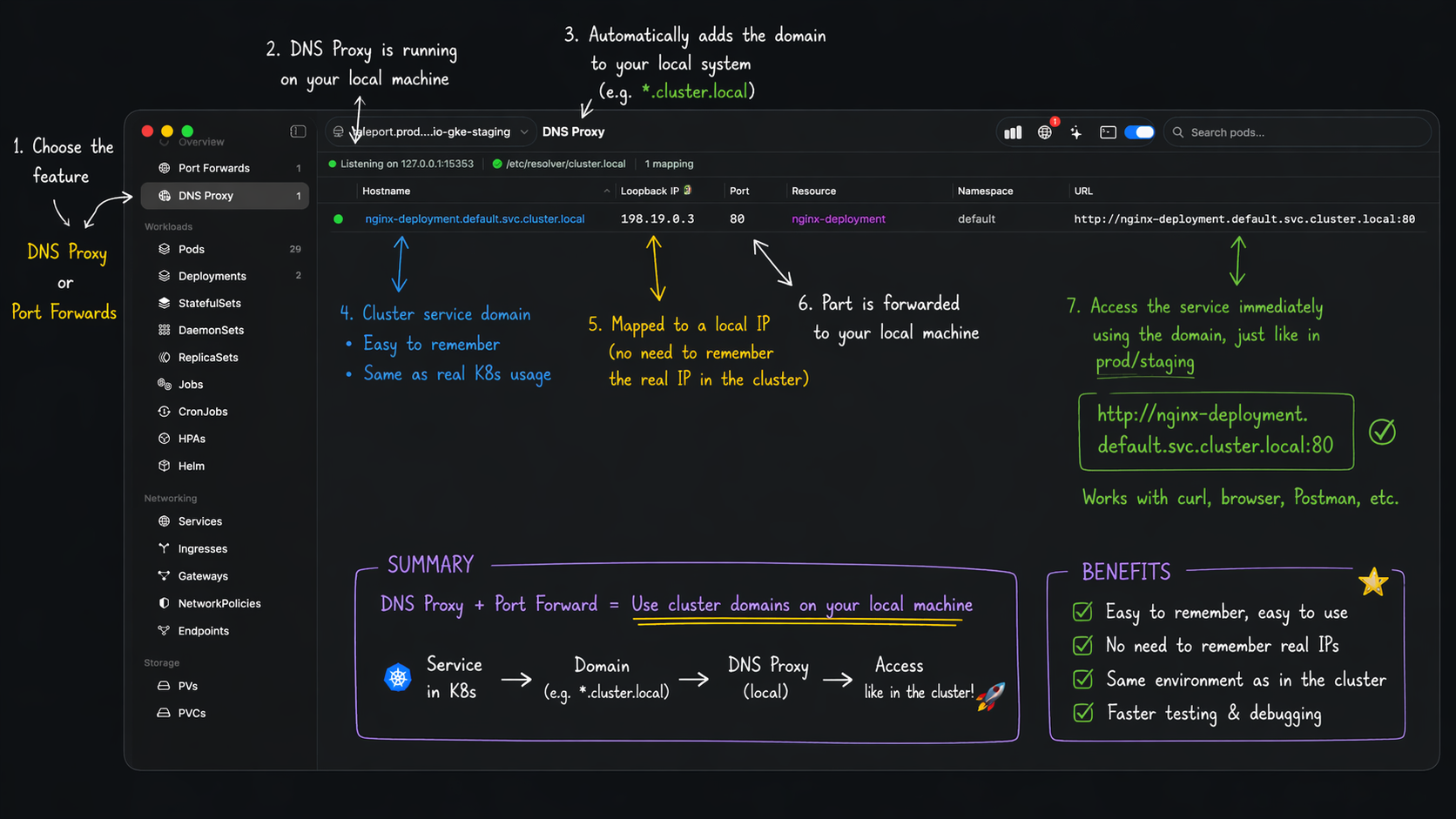
Which Name a Forward Gets
Krust only uses names that exist in the cluster, so what works on your Mac matches what the app's own config says.
| You forward | Name on your Mac |
|---|---|
| A Service | <service>.<namespace>.svc.cluster.local on the Service port |
| A Deployment, StatefulSet or DaemonSet | The Service that selects its pods, on that Service's port. A normal Service wins over a headless one. |
| A StatefulSet pod | <pod>.<headless-service>.<namespace>.svc.cluster.local on the pod port |
| An ordinary pod, or a workload no Service selects | No cluster name exists, so the forward runs on localhost |
A workload forwarded through its Service appears in Port Forwards as that Service, with the pod it currently reaches next to it.
Short .svc Names
Many in-cluster configs use the short form <service>.<namespace>.svc instead of the full .svc.cluster.local name. Inside a pod, the resolv.conf search list fills in the rest. Krust treats <service>.<namespace>.svc as <service>.<namespace>.svc.cluster.local, so a DNS-routed forward answers both names.
Local Routing setup turns short names on as its last step. It asks for your administrator password once and adds /etc/resolver/svc, a two-line file that points the svc domain at Krust DNS on 127.0.0.1:15353. Nothing runs in the background. If you skipped the password prompt, turn it on later in Settings → Local Routing → Short .svc Names; Remove there deletes the file again.
The step exists because macOS upgrades DNS servers such as 8.8.8.8 and 1.1.1.1 to encrypted DNS and sends .svc lookups over HTTPS, where the Network Extension cannot see them. A resolver file for the domain is always queried directly. Full .svc.cluster.local names work without it.
A single-broker Kafka that advertises kafka.kafka.svc:9092 is the common case: clients connect to whatever the broker advertises, not to the address you bootstrapped with. Forward the Service with Local Routing on, and a Kafka client on your Mac can bootstrap, read the advertised address, and produce and consume without editing /etc/hosts.
kcat -b kafka.kafka.svc:9092 -L
kcat -b kafka.kafka.svc:9092 -t demo -P <<< "hello from my Mac"
If a short name failed to resolve before you set up Local Routing, macOS may have cached that failure. Clear it once with sudo dscacheutil -flushcache; sudo killall -HUP mDNSResponder.
Clustered Apps: Forward All Pods (Pro)
A Kafka cluster with several brokers, Strimzi included, advertises each broker by its own pod name under a headless Service, such as kafka-0.kafka-headless.kafka.svc:9092. MongoDB replica sets, Cassandra, Elasticsearch and ZooKeeper work the same way. One forward reaches one pod, so the client fails as soon as it is sent to another member.
Right-click a StatefulSet or a headless Service and choose Forward All Pods. Krust forwards every pod (up to 16) on its own local address and DNS name, <pod>.<headless-service>.<namespace>.svc, plus the headless Service name itself for bootstrapping. Pods that are added, removed or restarted are picked up within about 15 seconds.
kcat -b kafka-headless.kafka.svc:9092 -L
# brokers: kafka-0.kafka-headless.kafka.svc:9092, kafka-1..., kafka-2...
Privacy and Network Scope
macOS may describe the Network Extension approval as adding VPN configurations, but this workflow is not an internet VPN. Krust scopes cluster-local DNS for local Kubernetes service workflows and does not forward public DNS through Krust.
- Handled by Krust: scoped cluster-local DNS used by DNS Proxy and local service forwarding.
- Not handled by Krust: normal internet browsing, public DNS, unrelated external traffic.
- Stored locally: active hostname mappings and local routing state.
Free vs Pro
Free includes 1 active DNS mapping and saved port-forward profiles you start manually. On Free, a second DNS forward runs on localhost instead. Pro unlocks multiple concurrent DNS mappings and auto-restore for multi-service local environments.
When to Use It
- Local apps need callback URLs that should not change every session.
- Postman or curl examples should stay close to in-cluster service names.
- Several internal services need to be open at once during debugging.
- You want a Kubernetes GUI that reduces port-forward command juggling.