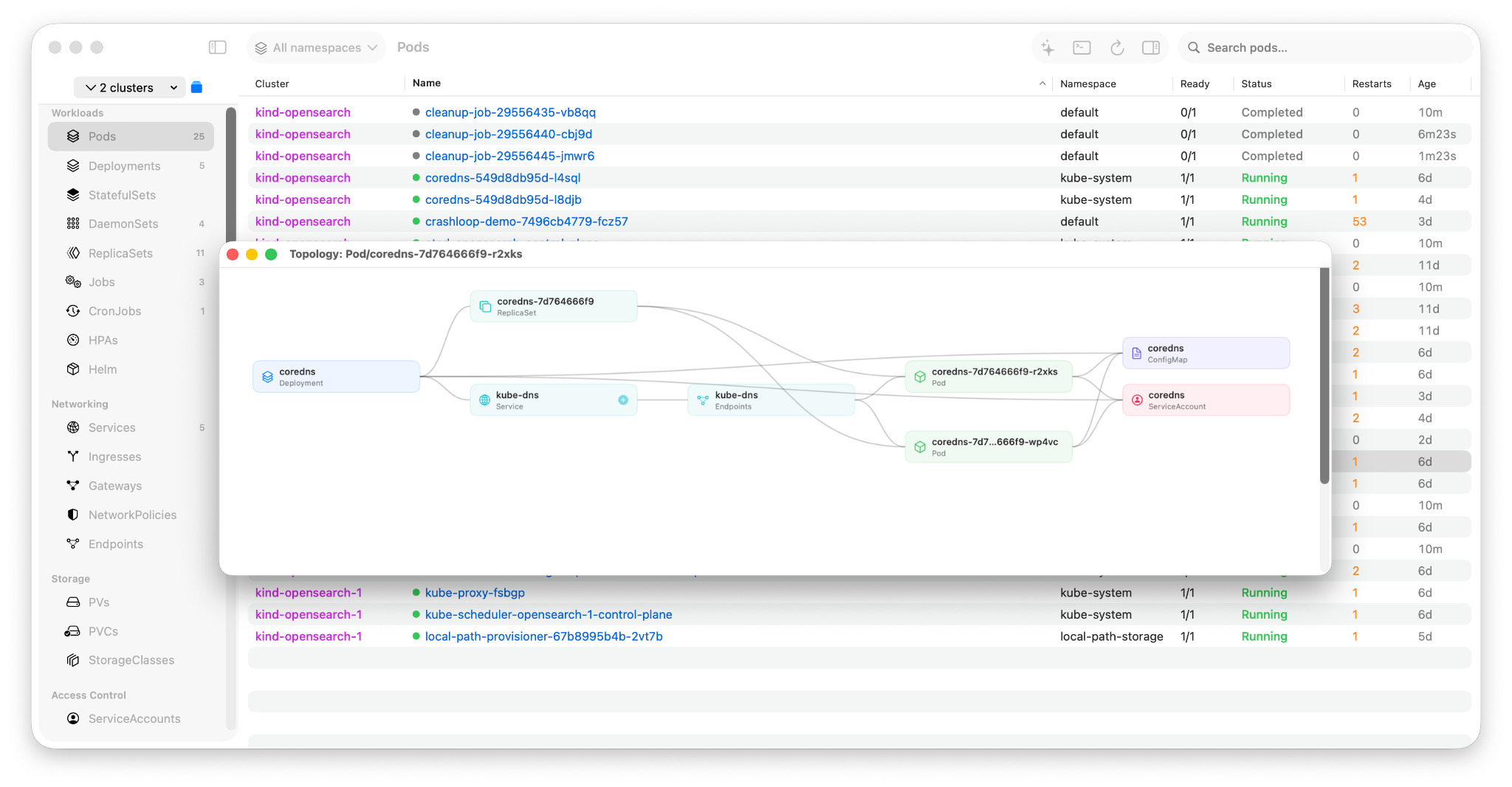
A Kubernetes topology graph is useful only when every edge answers a diagnostic question. Deployment → ReplicaSet → Pod explains rollout ownership. Service → EndpointSlice → Pod explains traffic selection. Pod → Secret explains a runtime dependency.
The graph should shorten the path to evidence. It should not be a decorative map of everything in the namespace.
TL;DR
- Start from the resource that owns the symptom: Service, workload, Pod, Job, or CronJob.
- Follow ownership edges for rollout and lifecycle questions.
- Follow selector and EndpointSlice edges for traffic questions.
- Follow Pod spec references for ConfigMap, Secret, ServiceAccount, and PVC dependencies.
- Open the target resource and verify its state, Events, logs, or YAML.
- Treat missing or surprising edges as evidence; do not assume the graph proves health.
Which Kubernetes relationships are real?
Kubernetes does not store one universal application graph. Different controllers and APIs express relationships in different ways.
| Relationship | Kubernetes evidence | Question it answers |
|---|---|---|
| Deployment → ReplicaSet → Pod | metadata.ownerReferences |
Which rollout created this Pod? |
| StatefulSet → Pod | owner reference and naming/controller state | Which controller owns this replica? |
| Service → Pod | label selector plus EndpointSlice membership | Which ready backends receive traffic? |
| EndpointSlice → Pod | endpoint targetRef when present |
Which object backs this endpoint? |
| Pod → ConfigMap/Secret/PVC | Pod spec references | Which dependency can block startup or runtime? |
| Pod → ServiceAccount | serviceAccountName |
Which identity does the workload use? |
Owner references let Kubernetes controllers find dependents and implement garbage collection. A Service selector is different: it groups Pods by labels rather than ownership. EndpointSlices record the actual backends selected for Service traffic.
If a topology tool treats every edge as the same kind of relationship, it hides the reason the resources are connected.
Start from the symptom, not the namespace
An incident normally gives you one anchor:
- an alert names a Deployment
- a client reports a failing Service
- a Pod is Pending or CrashLooping
- an Argo CD Application is Degraded
- a Job has failed
Start there. Expanding the whole cluster first produces a dense graph with no diagnostic priority.
For a failing Service, the useful path is:
Service
  → EndpointSlice
    → ready and terminating endpoint state
      → Pod
        → readiness, Events, logs
For a failed rollout, the useful path is:
Deployment
  → current ReplicaSet
    → new Pods
  → previous ReplicaSet
    → old Pods
The second path makes comparison possible. If only the new ReplicaSet fails, compare image, environment, probes, resources, and mounted dependencies between revisions.
How do selectors change the graph?
A Service does not own its Pods. It selects them. That distinction explains several common failures:
- a Deployment can be healthy while the Service selects no Pods
- a Service can select Pods from an older ReplicaSet if labels overlap
- Pods can match labels but remain absent from ready endpoints
- a selectorless Service may rely on manually managed EndpointSlices
Inspect the exact Service selector and Pod labels. Then inspect every EndpointSlice labeled with kubernetes.io/service-name=<service>.
The Kubernetes Service no endpoints guide covers this path in detail. The topology view should take you to that evidence faster; it does not replace the evidence.
What can a missing edge tell you?
A missing edge can be more useful than a populated one.
Service has no Pod edge
Check selector mismatch, namespace, readiness, and EndpointSlices. Do not begin with DNS.
Pod has no expected Secret or ConfigMap edge
Read the Pod spec. The reference may have changed, the resource may be optional, or the dependency may exist under another name. Pod Events usually expose a failed mount or missing key.
Deployment points to multiple ReplicaSets
That is normal across rollout history. Compare desired, current, ready, and available replicas. Identify which ReplicaSet owns the failing Pods before changing the Deployment.
EndpointSlice points to an unexpected Pod
Check label overlap and rollout state. A broad selector can route traffic to a workload that was never intended as a backend.
How Krust builds a focused topology
Krust starts from a selected resource and asks the Kubernetes API for related objects. It resolves edges through:
- owner references
- Service label selectors
- Endpoint and EndpointSlice target references
- Pod volume and environment references
serviceAccountName
Supported starting points include Deployments, StatefulSets, DaemonSets, Services, Pods, Jobs, and CronJobs. Nodes can be expanded when you need the next dependency rather than loading an entire namespace graph upfront.
The graph remains tied to the selected Kubernetes context. In multi-cluster mode, the context is part of the lookup so a resource with the same name in another cluster does not become an accidental target.
Open Krust Resource Topology for the supported roots, interaction model, and relationship types.
Three incident paths worth memorizing
1. Service returns 503 or has no backends
Follow Service → EndpointSlice → Pod. Verify selector, endpoint readiness, Pod readiness, and targetPort. Only investigate DNS or network policy after the endpoint path is correct.
2. Rollout is stuck
Follow Deployment → ReplicaSet → Pod. Compare the current and previous ReplicaSets. Read Events before logs when Pods are Pending, cannot mount a volume, or cannot pull an image. Use revision diff before rollback.
3. Pod starts but the application fails
Follow the Pod to its ConfigMaps, Secrets, ServiceAccount, and PVCs. Confirm the referenced names and keys, then read application logs. A dependency edge can explain a configuration or identity failure that CPU and memory charts cannot.
What topology does not prove
- An edge does not prove the target is healthy.
- A matching selector does not prove an endpoint is ready.
- An owner reference does not prove a rollout completed.
- A Secret edge does not prove the expected key exists.
- A visual path does not prove network reachability.
Use the graph to choose the next inspector, not to skip inspection.
Common wrong moves
- Rendering every resource in the cluster: the result is inventory, not diagnosis.
- Calling selector edges ownership: Services do not own selected Pods.
- Ignoring edge types: ownership, traffic, and configuration dependencies behave differently.
- Stopping at the Pod: many failures originate in referenced configuration, storage, or identity.
- Assuming the graph is current without context: confirm cluster, namespace, and watcher state.
FAQ
Is Kubernetes topology the same as an Argo CD resource tree?
No. Argo CD organizes resources around desired state and application ownership. A Kubernetes operations topology follows live relationships such as controllers, selectors, endpoints, and Pod references. The two views overlap but answer different questions.
Why can one resource have more than one parent?
Different relationship types can point at the same resource. A Pod can be owned by a ReplicaSet, selected by multiple Services, and reference several configuration resources.
Does Kubernetes store Deployment-to-Service ownership?
No. The usual connection is inferred because the Service selector matches labels on Pods managed by the Deployment.